You do the medicine. TRACE does the paperwork.
After a long shift, the last thing you want is to reconstruct everything you did out of forms and dropdowns. You already know what happened. You shouldn’t have to remember how to enter it.
The usual route Remember → Find the form → Work out which template → Fill in the fields → Realise you missed something → Go back → Save → Do it again tomorrow
With TRACE Talk → TRACE asks → Done
Built for doctors who are too busy to keep a logbook.
Designed around the reality of clinical work rather than around a database schema.
Log it while it’s fresh
Capture a case straight after the ward round, the shift or the procedure list — before the details go.
Let TRACE remember the fields
You don’t need to think about which field comes next. TRACE works out what is relevant and prompts you when something important is missing.
See your experience grow
Case mix, procedure numbers and supervision levels are counted as you log, so you can see where you actually are.
Take it with you
Start after a ward round and finish at your desk. Your logbook syncs across iPhone, iPad and Mac through your own iCloud.
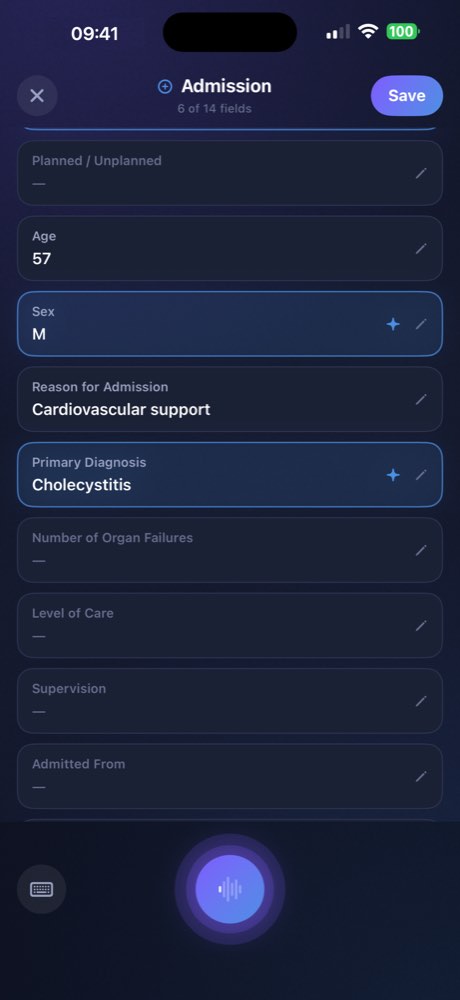
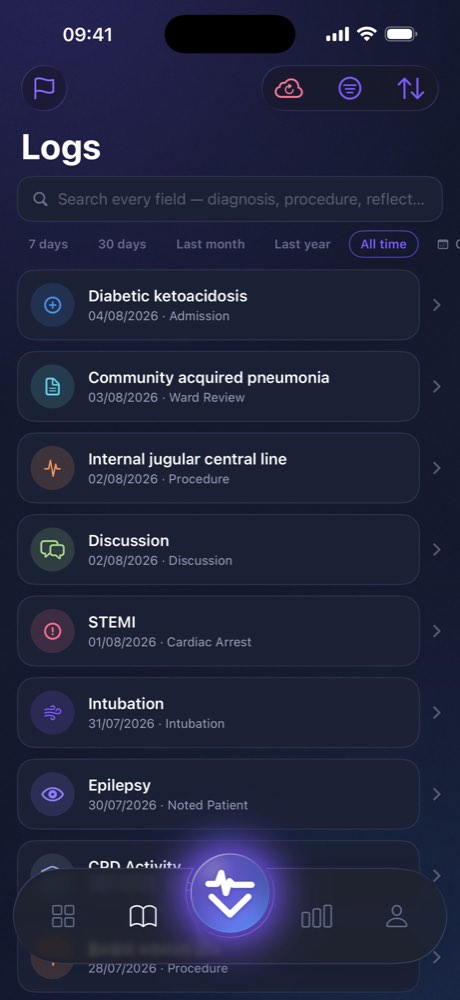
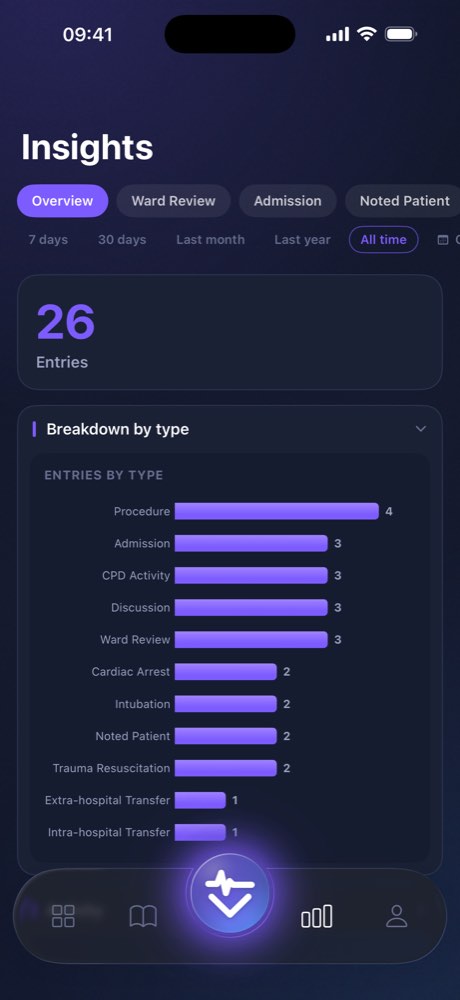
01 · Conversational logging
It’s a conversation, not a form.
You don’t think in dropdown menus, so you shouldn’t have to log in them. Describe what happened:
“Fifty-four-year-old admitted with severe acute pancreatitis, ultrasound confirmed gallstones, started on aggressive fluid resuscitation.”
TRACE “Noted. What level of supervision was that?”
“Local.”
One word, and it is filed. You don’t need to remember which field comes next, and you don’t need to be looking at the screen for most of it.
Talk. TRACE asks. Done.
Talk
Describe the case or procedure naturally.
TRACE asks
Missing something important? TRACE asks a follow-up question.
You’re done
Your structured entry is saved and your totals update automatically.
02 · Built for appraisal and revalidation
Structured evidence, ready when review comes.
Built around what UK clinicians are actually asked for: appraisal, training portfolios and GMC revalidation.
Exports that need no tidying
Any date range, as a formatted PDF or an Excel workbook with a sheet per template. Choose which fields go in and leave out the ones you would rather not share.
Reflection while it is still fresh
Templates prompt for the educational reflection at the time, rather than leaving you to reconstruct it from memory weeks later.
Counted for you
Case mix, procedure tallies, supervision levels and attendance are totalled as you log. Nothing to add up the night before.
03 · Privacy by architecture
Built for anonymous records
TRACE is designed so that patient-identifying information is never needed. Templates use an age band rather than a date of birth, and there is no patient-name field anywhere in the app.
Typed information. TRACE automatically checks typed input for identifiers such as names, NHS numbers, dates of birth, postcodes and hospital numbers before anything is sent.
Spoken information. Conversational voice input is streamed to Google Cloud’s Gemini service so TRACE can understand what you say and respond in real time. Because speech has to be processed before it can be checked, TRACE warns you before opening the microphone and asks you not to name a patient. You can always decline and type instead, or turn the assistant off entirely.
Nothing is recorded. Audio is streamed as you speak and is never written to a file — not on your phone and not by TRACE. There is no audio session to play back later.
A final check before export. Before you export your logbook, TRACE checks for information that looks identifiable and lets you remove it first.
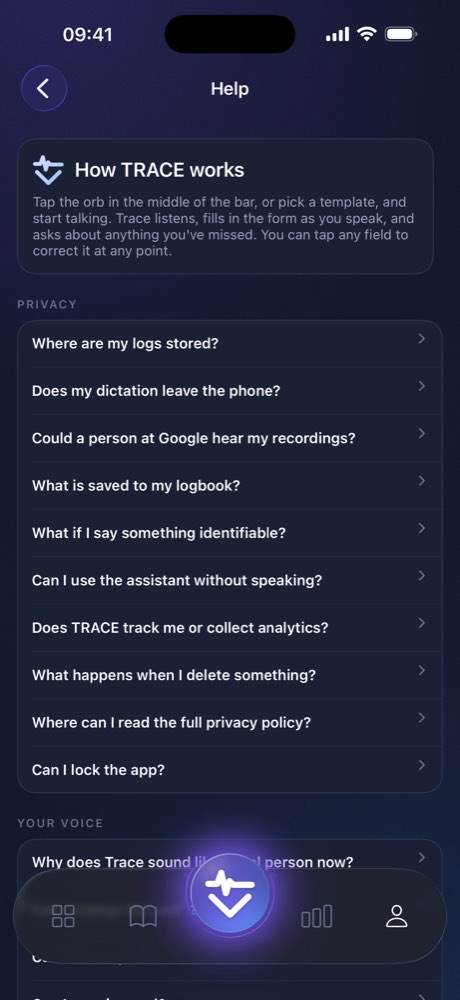
Your logbook never touches our servers.
Most medical apps ask you to trust their database with clinical notes. TRACE is built so that it doesn’t have to ask.
On your devices, in your iCloud
No account and no password. Your logbook lives in private storage on your devices and syncs through your own iCloud container. We never receive or store it.
Anonymous by design
No patient-name field anywhere in the app, an age band instead of a date of birth, and a check for identifiers before anything is exported.
Nothing watching you
No advertising, no analytics, no tracking, no crash reporting. Device encryption, and Face ID if you want it.
What our server does do. TRACE operates one small service. It checks your subscription with Apple and issues a short-lived pass so the voice assistant can run without an API key hidden inside the app. It never receives your logbook entries, and your speech goes from your device to Google directly rather than through us.
What it costs, and what stays yours.
Free for seven days. After that, adding to your logbook needs a subscription — but reading, searching and exporting what you have already logged never does.
Without a subscription
Free, and not time-limited
- Read, search and browse everything you have logged
- Full PDF and Excel export, for any date range
- Sync across iPhone, iPad and Mac through your own iCloud
- The identifier check before every export
TRACE Pro
£4.99 a month or £39.99 a year in the UK, after a seven-day free trial. The App Store shows the price in your own currency.
- Everything above
- Adding to your logbook — by voice or by hand
- The conversational assistant, which asks about what you left out
- Fields filled in from what you said, not from a form
Your record is never held hostage. Subscriptions are handled by Apple, and you can cancel in Settings at any time. If one lapses, your logbook stays exactly where it is and you keep reading, searching and exporting it. A lapsed card should never stand between a doctor and their own appraisal evidence.
Questions
Does my dictation leave my phone?
Yes. TRACE uses Google Cloud’s enterprise Gemini API for its conversational voice assistant, so audio is streamed directly to Google Cloud while you speak. This is what allows TRACE to understand natural speech and ask follow-up questions in real time.
Is any of it recorded?
No. Audio is streamed while you speak and is never written to a file — not on your phone and not by TRACE.
Could someone at Google hear it?
TRACE uses a paid Google Cloud account. Your input is not used to improve Google’s products and is not read by people. TRACE also operates under Google’s data processing agreement, which puts that in a contract rather than a promise. The free tier works differently; TRACE has never used it.
What if I accidentally say something identifiable?
TRACE cannot make something you have said unsaid. That’s why it asks you not to name patients before opening the microphone. TRACE cleans the resulting transcript before writing it into your logbook, and checks your export for information that looks identifiable. Typed input is checked before it is sent.
Where is my logbook kept?
On your devices and in your own iCloud account. TRACE does not receive or store your logbook.
Can TRACE help with clinical decisions?
No. TRACE records professional activity you have already completed for your logbook, appraisal and revalidation. It does not assess your clinical decisions, review your practice or provide advice about patient care.
TRACE is showing a message about the service. What does that mean?
Occasionally TRACE shows a short notice when the voice assistant is slow or unavailable — usually because the speech service it depends on is having problems, or because maintenance is planned. The notice says what is affected. Some can be dismissed; others will stop a voice session from starting, because beginning to dictate a case into a service that cannot answer loses the case rather than only the time. Your logbook, your exports and typed entry are never affected and stay available throughout.
What happens if my subscription lapses?
Your existing logbook remains yours. Reading, searching and exporting continue to work. Only new entries and the assistant stop.
Your next shift doesn’t need another admin job.
Talk through your cases while they’re still fresh. Let TRACE keep the logbook up to date.
Download on the App StoreiPhone, iPad and Mac · Synced through your own iCloud